EasyWeds Developer Guide
Table of Contents
- Acknowledgements
- Setting up, getting started
- Design
- Implementation
- Documentation, logging, testing, configuration, dev-ops
- Appendix: Requirements
- Appendix: Instructions for manual testing
- Appendix: Effort
- Appendix: Planned Enhancements
Acknowledgements
EasyWeds is a brownfield software project based off AddressBook Level-3 (UG, DG), taken under the CS2103T Software Engineering module held by the School of Computing at the National University of Singapore.
Java dependencies:
- JavaFX for GUI
- JUnit5 for testing
Documentation dependencies:
- Markbind for rendering the website
- PlantUML for creating UML diagrams
Setting up, getting started
Refer to the guide Setting up and getting started.
Design
💡 Tip: The .puml files used to create diagrams in this document docs/diagrams folder. Refer to the PlantUML Tutorial at se-edu/guides to learn how to create
and edit diagrams.
Architecture
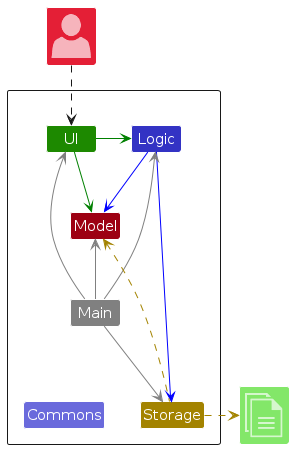
The Architecture Diagram given above explains the high-level design of the App.
Given below is a quick overview of main components and how they interact with each other.
Main components of the architecture
Main (consisting of classes Main and MainApp) is in charge of the app launch and shut down.
- At app launch, it initializes the other components in the correct sequence, and connects them up with each other.
- At shut down, it shuts down the other components and invokes cleanup methods where necessary.
The bulk of the app's work is done by the following four components:
UI: The UI of the App.Logic: The command executor.Model: Holds the data of the App in memory.Storage: Reads data from, and writes data to, the hard disk.
Commons represents a collection of classes used by multiple other components.
How the architecture components interact with each other
The Sequence Diagram below shows how the components interact with each other for the scenario where the user issues the command delete 1.
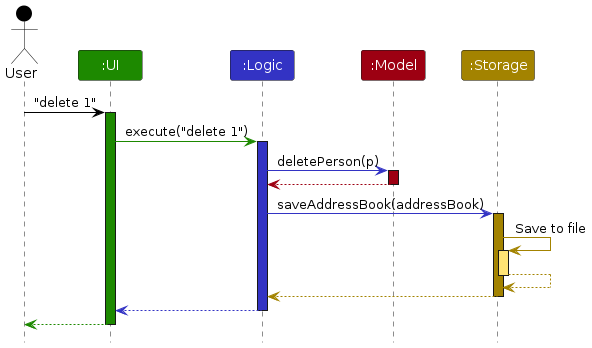
Each of the four main components (also shown in the diagram above),
- defines its API in an
interfacewith the same name as the Component. - implements its functionality using a concrete
{Component Name}Managerclass (which follows the corresponding APIinterfacementioned in the previous point.
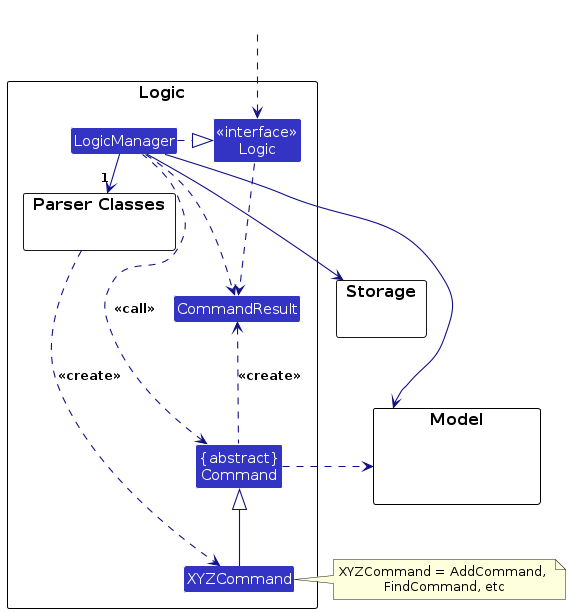
For example, the Logic component defines its API in the Logic.java interface and implements its functionality using the LogicManager.java class which follows the Logic interface. Other components interact with a given component through its interface rather than the concrete class (reason: to prevent outside component's being coupled to the implementation of a component), as illustrated in the (partial) class diagram below.
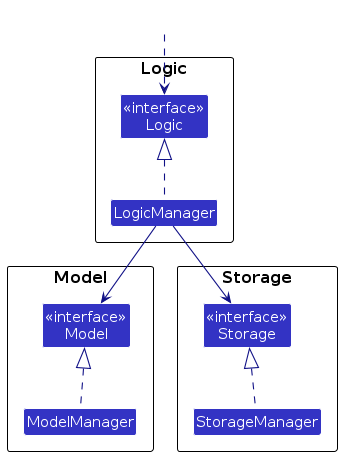
The sections below give more details of each component.
UI component
API : Ui.java)
[Ui is the interface for the UI component. It provides the functionality of the Ui]
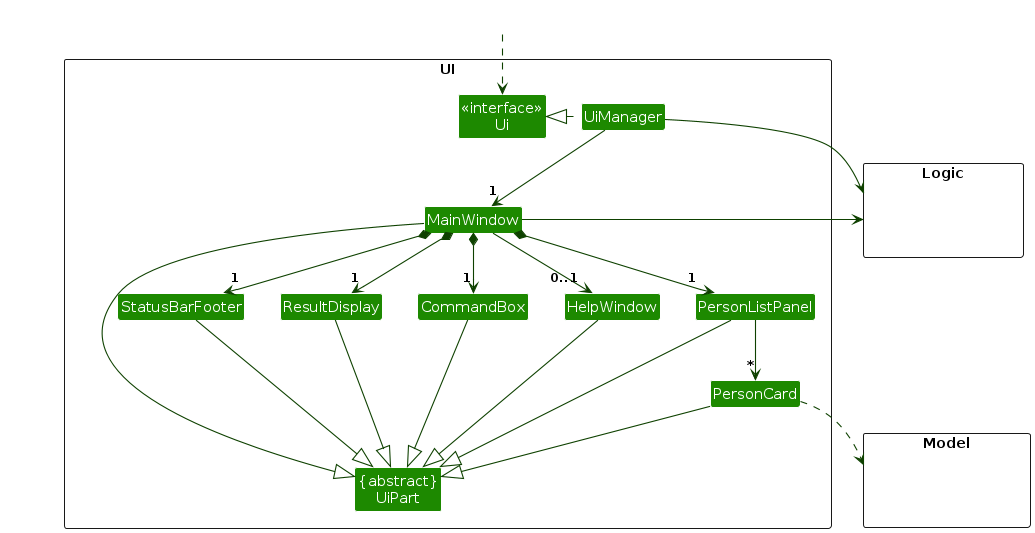
The UI consists of a MainWindow that is made up of parts e.g.CommandBox, ResultDisplay, PersonListPanel, StatusBarFooter etc. All these, including the MainWindow, inherit from the abstract UiPart class which captures the commonalities between classes that represent parts of the visible GUI.
The UI component uses the JavaFx UI framework. The layout of these UI parts are defined in matching .fxml files that are in the src/main/resources/view folder. For example, the layout of the MainWindow is specified in MainWindow.fxml
The UI component,
- executes user commands using the
Logiccomponent. - listens for changes to
Modeldata so that the UI can be updated with the modified data. - keeps a reference to the
Logiccomponent, because theUIrelies on theLogicto execute commands. - depends on some classes in the
Modelcomponent, as it displaysPersonobject residing in theModel.
Logic component
API : Logic.java)
[Logic is the interface for the Logic component. It shows you methods for executing commands and accessing the application's data for display in the UI.]
Here's a (partial) class diagram of the Logic component:
The sequence diagram below illustrates the interactions within the Logic component, taking execute("delete 1") API call as an example.
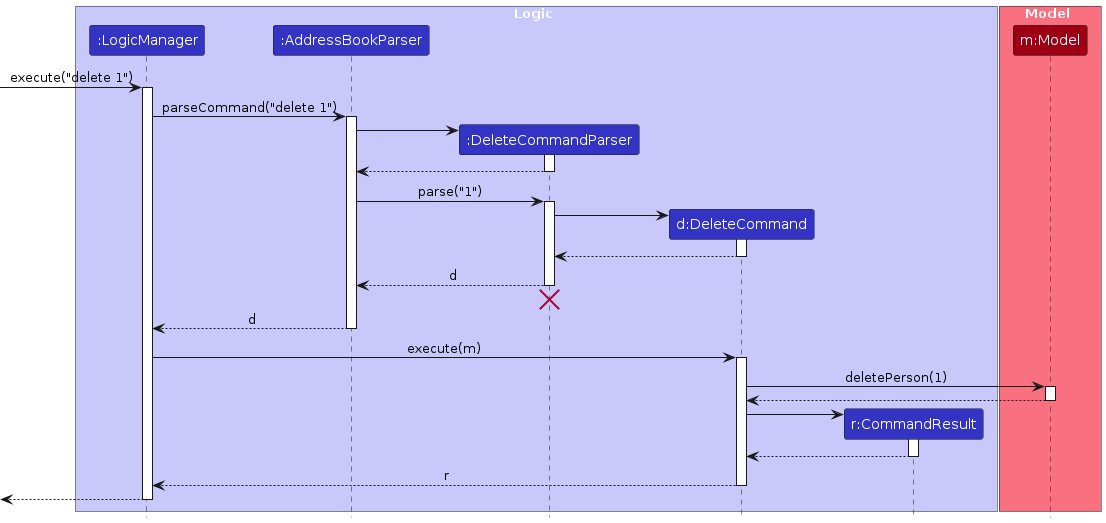
Note: The lifeline for DeleteCommandParser should end at the destroy marker (X) but due to a limitation of PlantUML, the lifeline continues till the end of diagram.
How the Logic component works:
- When
Logicis called upon to execute a command, it is passed to anAddressBookParserobject which in turn creates a parser that matches the command (e.g.,DeleteCommandParser) and uses it to parse the command. - This results in a
Commandobject (more precisely, an object of one of its subclasses e.g.,DeleteCommand) which is executed by theLogicManager. - The command can communicate with the
Modelwhen it is executed (e.g. to delete a person).
Note that although this is shown as a single step in the diagram above (for simplicity), in the code it can take several interactions (between the command object and theModel) to achieve. - The result of the command execution is encapsulated as a
CommandResultobject which is returned back fromLogic.
Here are the other classes in Logic (omitted from the class diagram above) that are used for parsing a user command:
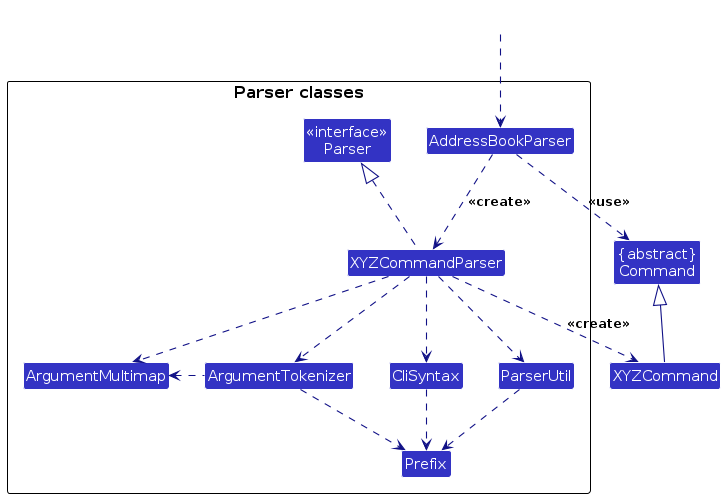
How the parsing works:
- When called upon to parse a user command, the
AddressBookParserclass creates anXYZCommandParser(XYZis a placeholder for the specific command name e.g.,AddCommandParser) which uses the other classes shown above to parse the user command and create aXYZCommandobject (e.g.,AddCommand) which theAddressBookParserreturns back as aCommandobject. - All
XYZCommandParserclasses (e.g.,AddCommandParser,DeleteCommandParser, ...) inherit from theParserinterface so that they can be treated similarly where possible e.g, during testing.
Model component
API : Model.java
[Model is the interface for the model component. It encapsulates the application's data structures and business logic, providing methods to access and modify contact, wedding and task data.]
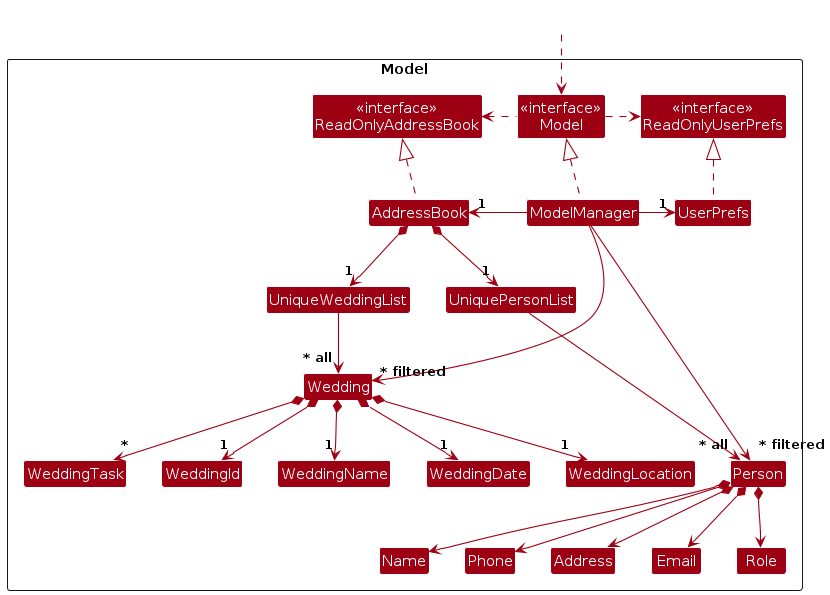
The Model component,
- stores the address book data i.e., all
Personobjects (which are contained in aUniquePersonListobject) and allWeddingobjects (which are contained in aUniqueWeddingList). - stores the currently 'selected'
Personobjects (e.g., results of a search query) as a separate filtered list which is exposed to outsiders as an unmodifiableObservableList<Person>that can be 'observed' e.g. the UI can be bound to this list so that the UI automatically updates when the data in the list change. - stores the currently 'selected'
Weddingobjects (e.g., results of a search query) as a separate filtered list which is exposed to outsiders as an unmodifiableObservableList<Wedding>that can be 'observed' e.g. the UI can be bound to this list so that the UI automatically updates when the data in the list change. - stores a
UserPrefobject that represents the user’s preferences. This is exposed to the outside as aReadOnlyUserPrefobjects. - does not depend on any of the other three components (as the
Modelrepresents data entities of the domain, they should make sense on their own without depending on other components)
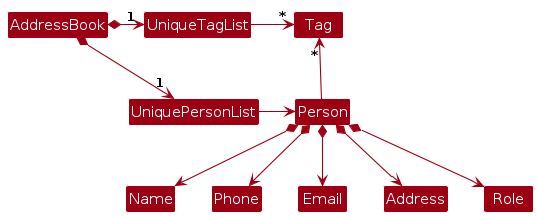
Note: An alternative (arguably, a more OOP) model is given below. It has a Tag list in the AddressBook, which Person references. This allows AddressBook to only require one Tag object per unique tag, instead of each Person needing their own Tag objects.
Storage component
API : Storage.java
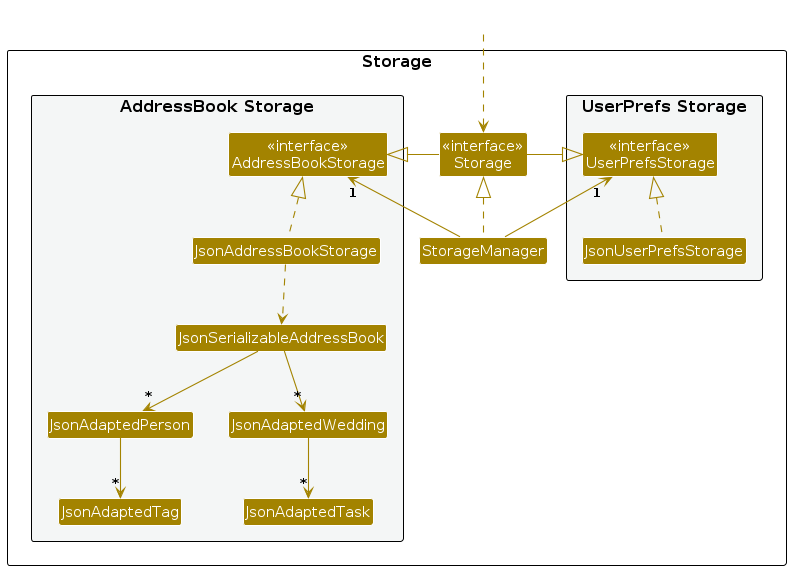
The Storage component,
- can save both address book data and user preference data in JSON format, and read them back into corresponding objects.
- inherits from both
AddressBookStorageandUserPrefStorage, which means it can be treated as either one (if only the functionality of only one is needed). - depends on some classes in the
Modelcomponent (because theStoragecomponent's job is to save/retrieve objects that belong to theModel)
Common classes
Classes used by multiple components are in the seedu.address.commons package.
Implementation
This section describes some noteworthy details on how certain features are or will be implemented.
1. Creating a wedding
The AddWeddingCommand allows users to create new wedding events within the application. This is essential for wedding planners to keep track of different wedding events they are managing.
Implementation Details
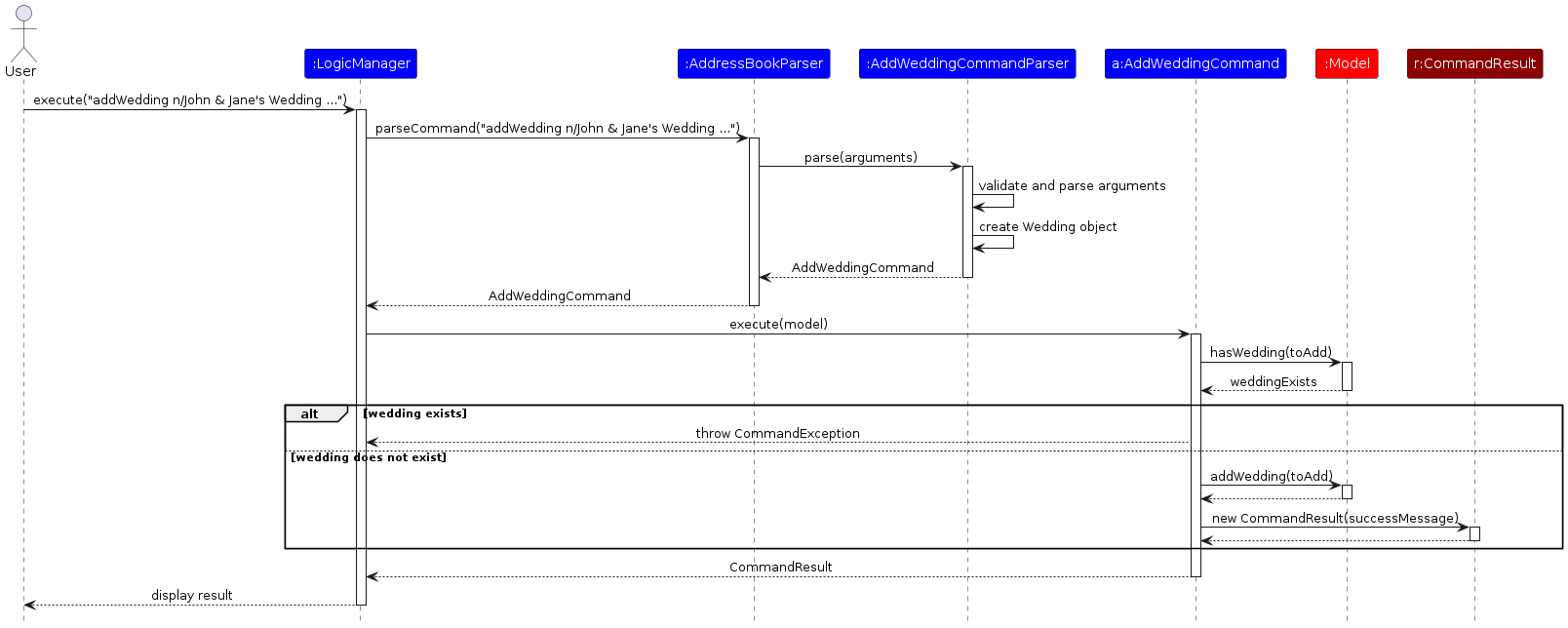
The AddWeddingCommand is implemented by extending the base Command class. It uses prefixes such as n/, d/, and l/, specifying required data fields for weddingName, weddingDate, and weddingLocation respectively. Once the data fields are filled, a new Wedding is added. It implements the following operations:
execute(Model)— Checks the current address book state by callingmodel.hasWedding(toAdd), and throws aCommandExceptionif a duplicate Wedding is foundaddWedding(wedding)— Adds the Wedding to the wedding list. This operation is exposed in the Model interface asModel#addWedding(Wedding).
Given below is an example usage scenario of how the addition mechanism behaves when the user tries to add a wedding to the wedding list:
Step 1. The user launches the application, with some contacts already added to the address book.
Step 2. The user executes addWedding command with specific details (e.g., addWedding n/John and Jane's Wedding d/20-Feb-2026 l/Marina Bay Sands). The AddWeddingCommand will then call execute(), which checks whether there is a duplicate Wedding in the wedding list before calling addWedding(Wedding).
Sequence Diagram
Design considerations:
Aspect: How wedding IDs are generated:
Alternative 1 (current choice): Automatically generate sequential wedding IDs (W1, W2, etc.) in the Wedding model.
- Pros: Easier to implement and more intuitive for users.
- Cons: May have issues with ID conflicts if weddings are deleted and re-added.
Alternative 2: Allow users to specify their own wedding IDs.
- Pros: More flexibility for users to create meaningful identifiers.
- Cons: More complex to implement and potential for user errors with duplicate IDs.
2. Deleting a wedding
The DeleteWeddingCommand allows users to remove wedding events from the application. This is particularly useful for removing completed or canceled weddings.
Implementation Details
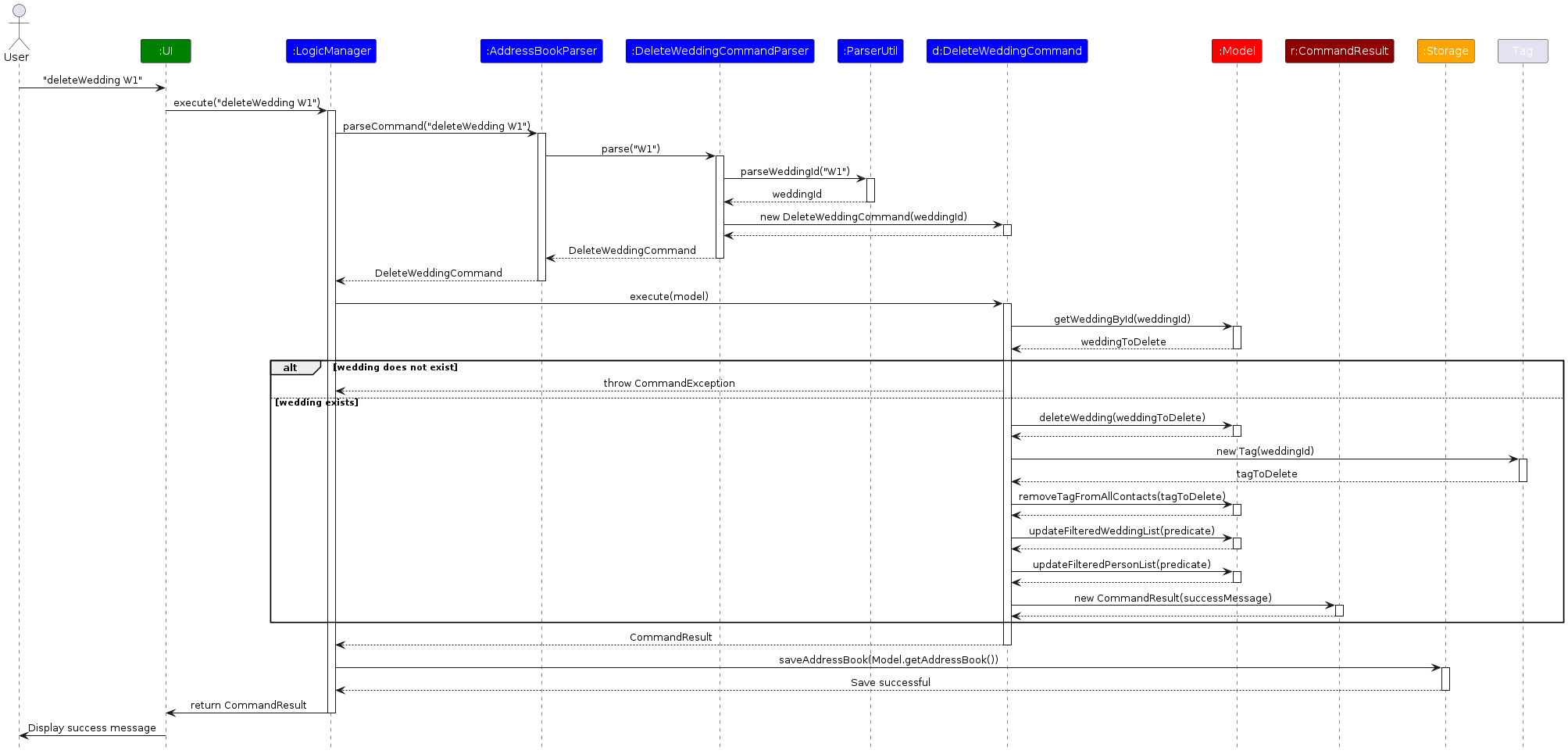
The DeleteWeddingCommand is implemented by extending the base Command class. It takes a WeddingId parameter to identify which wedding to delete. It implements the following operations:
execute(Model)— Retrieves the wedding to delete usingmodel.getWeddingById(weddingId), throwing aCommandExceptionif no matching wedding is found.deleteWedding(weddingToDelete)— Removes the Wedding from the wedding list.removeTagFromAllContacts(tag)— Removes the wedding tag from all contacts that were associated with the wedding.
Given below is an example usage scenario of how the deletion mechanism behaves:
Step 1. The user executes deleteWedding W1 to delete the wedding with ID W1.
Step 2. The DeleteWeddingCommand finds the wedding with ID W1 in the model and removes it.
Step 3. The command also finds all contacts tagged with W1 and removes that tag from them, ensuring data consistency.
Sequence Diagram
Design considerations:
Aspect: How wedding deletion affects associated data:
Alternative 1 (current choice): Remove wedding tags from all contacts when a wedding is deleted.
- Pros: Maintains data consistency and prevents orphaned tags.
- Cons: Slightly more complex implementation and slower deletion operation.
Alternative 2: Keep the tags on contacts even when a wedding is deleted.
- Pros: Simpler implementation and faster deletion.
- Cons: Results in orphaned tags that reference non-existent weddings.
3. Tagging a contact to a wedding
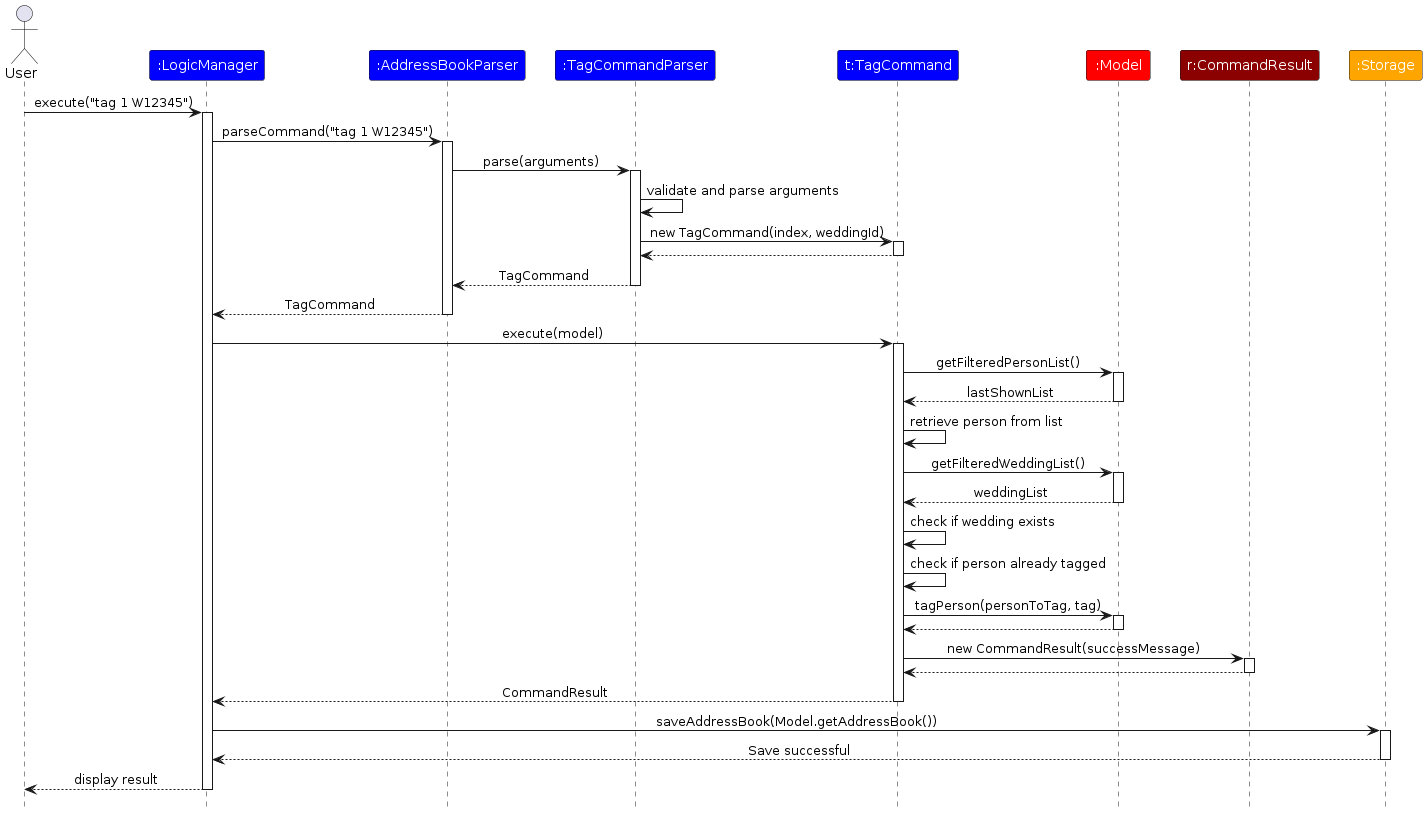
The TagCommand allows users to associate contacts with specific wedding events. This is essential for keeping track of which vendors and clients are associated with each wedding.
Implementation Details
The TagCommand is implemented by extending the base Command class. It takes an Index parameter to identify the contact and a WeddingId to identify the wedding. It implements the following operations:
execute(Model)— Retrieves the person at the specified index usingmodel.getFilteredPersonList()and checks if the wedding exists.tagPerson(person, tag)— Associates the contact with the wedding by adding a tag.
Given below is an example usage scenario:
Step 1. The user executes tag 1 W1 to tag the first contact in the list to wedding W1.
Step 2. The TagCommand retrieves the person at index 1 and creates a new tag with wedding ID W1.
Step 3. The command adds this tag to the person's tag set, creating an association between the contact and the wedding.
Sequence Diagram
Design considerations:
Aspect: How wedding-contact associations are stored:
Alternative 1 (current choice): Store the association as tags on Person objects.
- Pros: Leverages existing tag functionality, making implementation simpler.
- Cons: Limited metadata can be stored about the association.
Alternative 2: Create a separate association entity that links persons and weddings.
- Pros: Could store additional information about the role in the wedding.
- Cons: More complex to implement and manage.
4. Untagging a contact from a wedding
The UntagCommand allows users to remove associations between contacts and weddings. This is useful when a vendor or client is no longer involved with a specific wedding.
Implementation Details
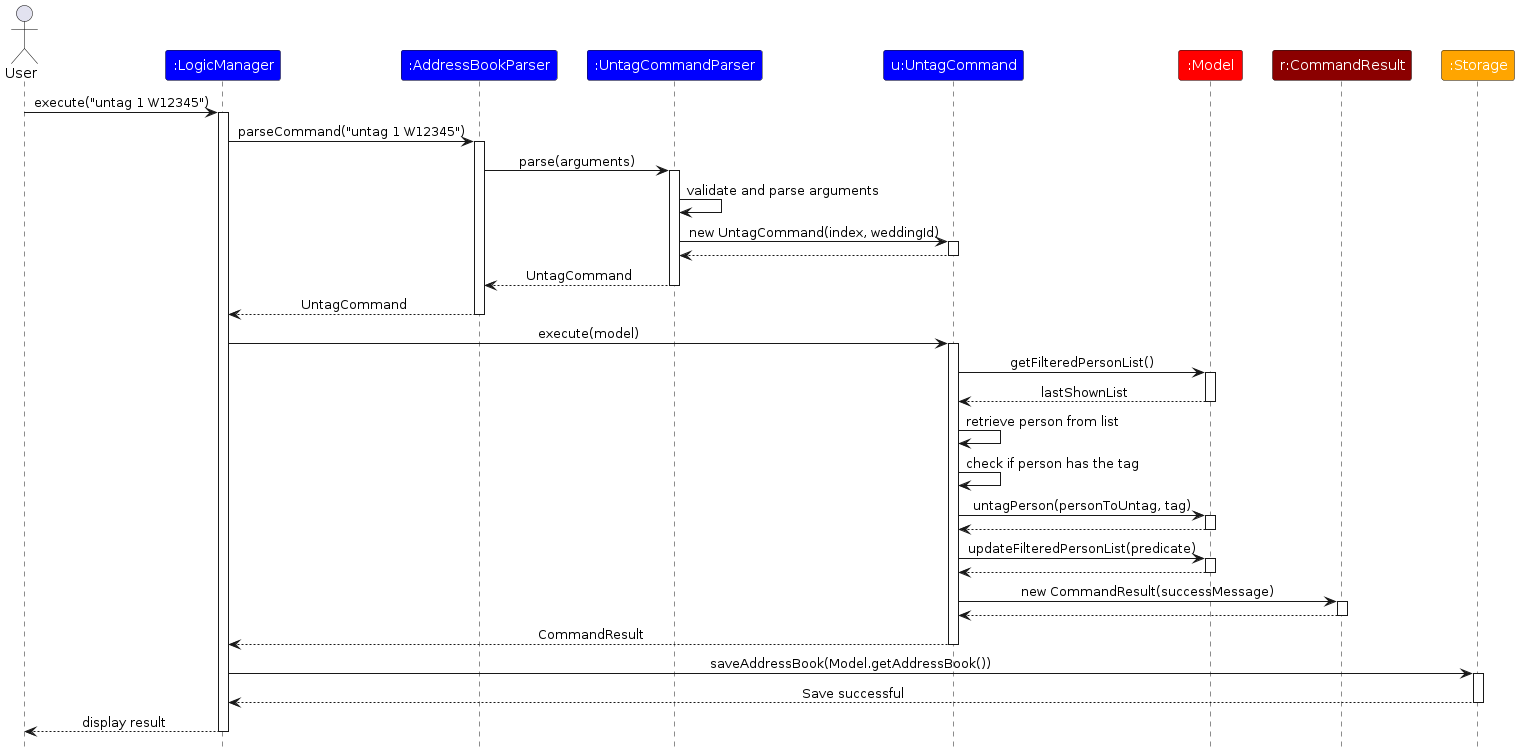
The UntagCommand is implemented similarly to the TagCommand. It takes an Index parameter to identify the contact and a WeddingId to identify the wedding to untag. It implements:
execute(Model)— Retrieves the person and checks if they have the specified wedding tag.untagPerson(person, tag)— Removes the wedding tag from the contact.
Given below is an example usage scenario:
Step 1. The user executes untag 1 W1 to remove the association between the first contact and wedding W1.
Step 2. The UntagCommand checks if the person has the W1 tag and removes it if present.
Sequence Diagram
Design considerations:
Aspect: Handling non-existent tags in untag command:
Alternative 1 (current choice): Check if the tag exists before attempting to remove it.
- Pros: Provides clear error messages to users.
- Cons: Requires additional checks in the command execution.
Alternative 2: Silently ignore untag requests for non-existent tags.
- Pros: Simpler implementation.
- Cons: Less informative for users, who might not realize the tag didn't exist.
5. Adding a task to a wedding
The AddTaskCommand allows users to add tasks to specific weddings. This helps wedding planners track what needs to be done for each wedding event.
Implementation Details
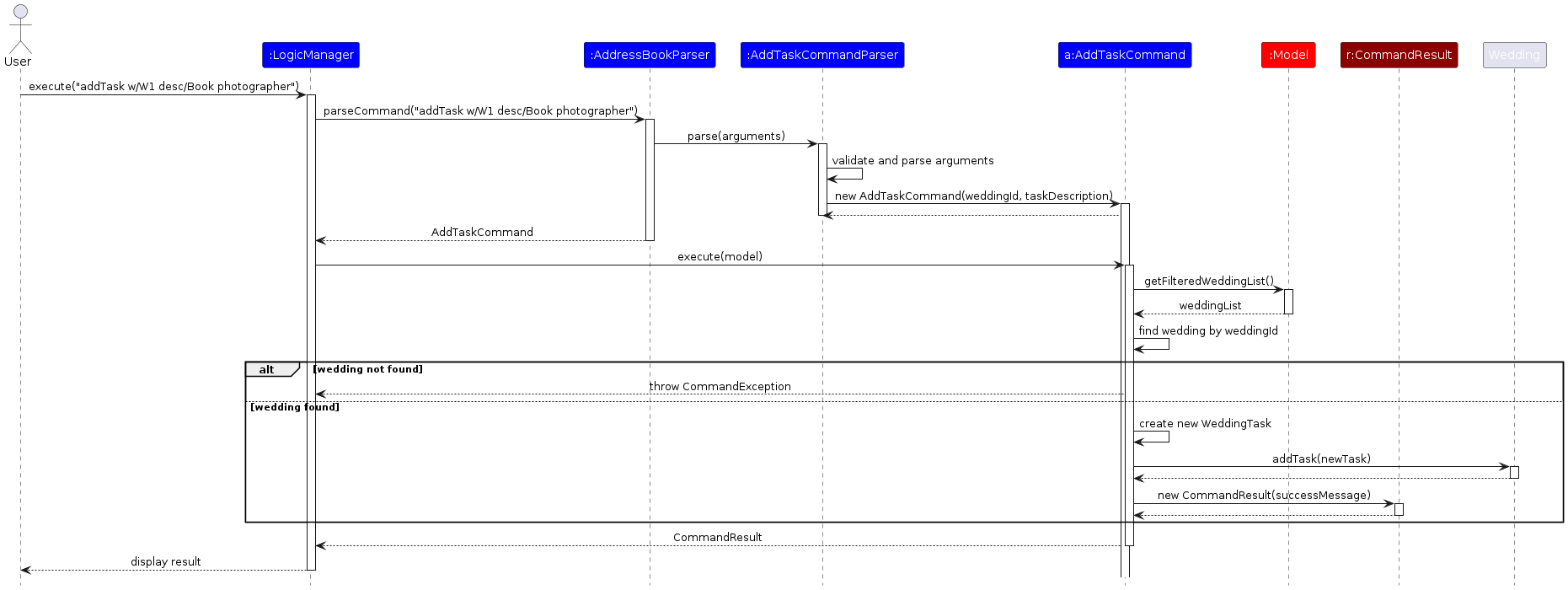
The AddTaskCommand extends the base Command class. It uses prefixes such as w/ and desc/ to specify the wedding ID and task description. It implements:
execute(Model)— Finds the wedding usingmodel.getFilteredWeddingList()and a predicate.addTask(task)— Adds the new task to the wedding's task list.
Given below is an example usage scenario:
Step 1. The user executes addTask w/W1 desc/Book photographer to add a new task to wedding W1.
Step 2. The AddTaskCommand finds wedding W1 and creates a new WeddingTask with the description.
Step 3. The command adds this task to the wedding's task list.
Sequence Diagram
Design considerations:
Aspect: Where tasks are stored:
Alternative 1 (current choice): Store tasks directly in the Wedding object.
- Pros: Simplifies implementation and maintains clear ownership.
- Cons: Limited flexibility in sharing tasks across weddings.
Alternative 2: Store tasks separately with references to weddings.
- Pros: More flexible for potential future features like shared tasks.
- Cons: More complex data management.
6. Deleting a task from a wedding
The DeleteTaskCommand allows users to remove tasks from weddings. This is useful for removing completed tasks or tasks that are no longer relevant.
Implementation Details
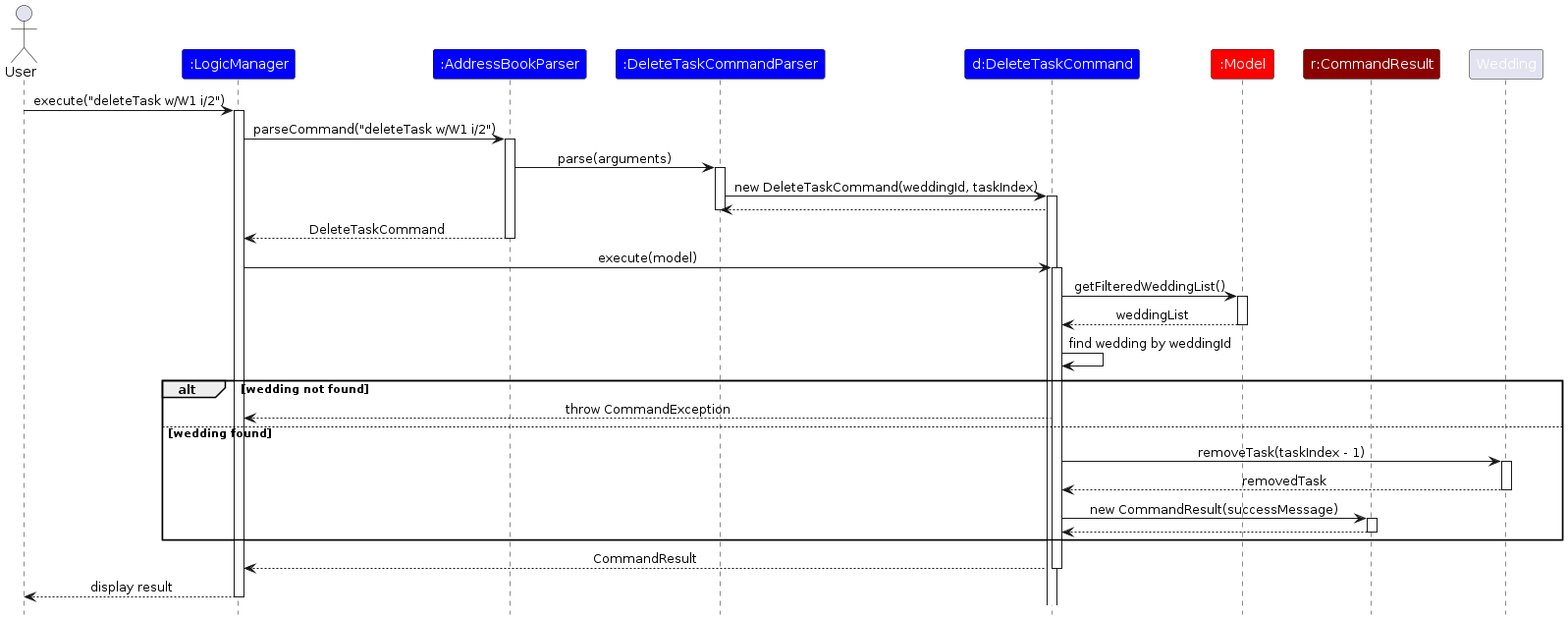
The DeleteTaskCommand extends the base Command class. It uses prefixes w/ for weddingID and i/ for the task index. It implements:
execute(Model)— Finds the wedding and validates the task index.removeTask(index)— Removes the task at the specified index from the wedding's task list.
Given below is an example usage scenario:
Step 1. The user executes deleteTask w/W1 i/2 to delete the second task from wedding W1.
Step 2. The DeleteTaskCommand finds wedding W1 and removes the task at index 2 from its task list.
Sequence Diagram
Design considerations:
Aspect: How task indices are handled:
Alternative 1 (current choice): Use 1-based indexing for users, converting to 0-based for internal operations.
- Pros: More intuitive for users who typically count from 1.
- Cons: Requires index conversion in command execution.
Alternative 2: Use 0-based indexing throughout the system.
- Pros: Consistent with internal array indexing.
- Cons: Less intuitive for non-technical users.
[Proposed] Undo/redo feature
Proposed Implementation
The proposed undo/redo mechanism is facilitated by VersionedAddressBook. It extends AddressBook with an undo/redo history, stored internally as an addressBookStateList and currentStatePointer. Additionally, it implements the following operations:
VersionedAddressBook#commit()— Saves the current address book state in its history.VersionedAddressBook#undo()— Restores the previous address book state from its history.VersionedAddressBook#redo()— Restores a previously undone address book state from its history.
These operations are exposed in the Model interface as Model#commitAddressBook(), Model#undoAddressBook() and Model#redoAddressBook() respectively.
Given below is an example usage scenario and how the undo/redo mechanism behaves at each step.
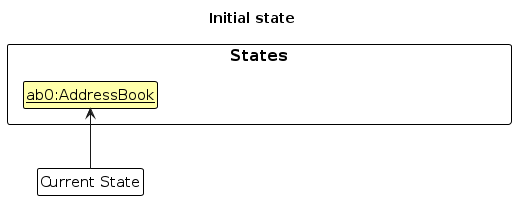
Step 1. The user launches the application for the first time. The VersionedAddressBook will be initialized with the initial address book state, and the currentStatePointer pointing to that single address book state.
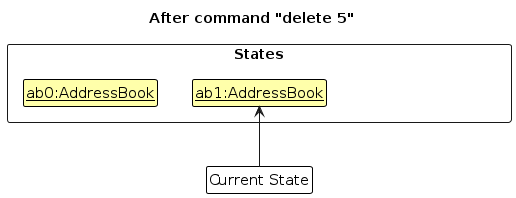
Step 2. The user executes delete 5 command to delete the 5th person in the address book. The delete command calls Model#commitAddressBook(), causing the modified state of the address book after the delete 5 command executes to be saved in the addressBookStateList, and the currentStatePointer is shifted to the newly inserted address book state.
Step 3. The user executes add n/David … to add a new person. The add command also calls Model#commitAddressBook(), causing another modified address book state to be saved into the addressBookStateList.
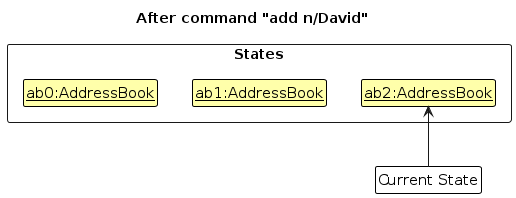
Note: If a command fails its execution, it will not call Model#commitAddressBook(), so the address book state will not be saved into the addressBookStateList.
Step 4. The user now decides that adding the person was a mistake, and decides to undo that action by executing the undo command. The undo command will call Model#undoAddressBook(), which will shift the currentStatePointer once to the left, pointing it to the previous address book state, and restores the address book to that state.
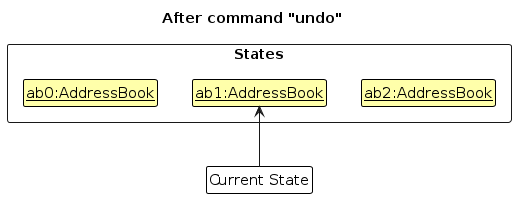
Note: If the currentStatePointer is at index 0, pointing to the initial AddressBook state, then there are no previous AddressBook states to restore. The undo command uses Model#canUndoAddressBook() to check if this is the case. If so, it will return an error to the user rather
than attempting to perform the undo.
The following sequence diagram shows how an undo operation goes through the Logic component:
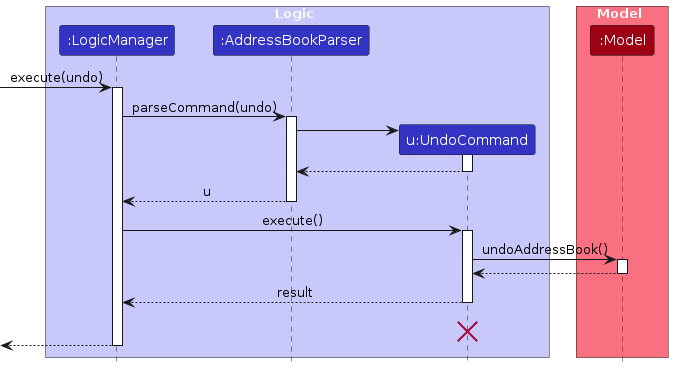
Note: The lifeline for UndoCommand should end at the destroy marker (X) but due to a limitation of PlantUML, the lifeline reaches the end of diagram.
Similarly, how an undo operation goes through the Model component is shown below:
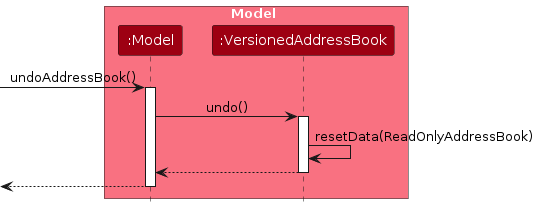
The redo command does the opposite — it calls Model#redoAddressBook(), which shifts the currentStatePointer once to the right, pointing to the previously undone state, and restores the address book to that state.
Note: If the currentStatePointer is at index addressBookStateList.size() - 1, pointing to the latest address book state, then there are no undone AddressBook states to restore. The redo command uses Model#canRedoAddressBook() to check if this is the case. If so, it will return an error to the user rather than attempting to perform the redo.
Step 5. The user then decides to execute the command list. Commands that do not modify the address book, such as list, will usually not call Model#commitAddressBook(), Model#undoAddressBook() or Model#redoAddressBook(). Thus, the addressBookStateList remains unchanged.
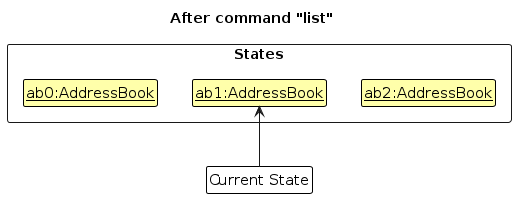
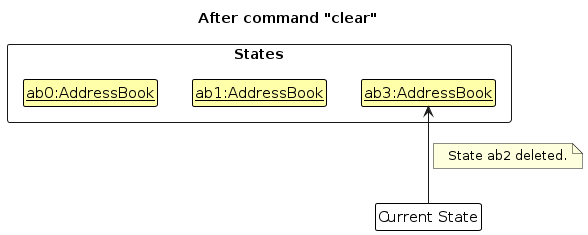
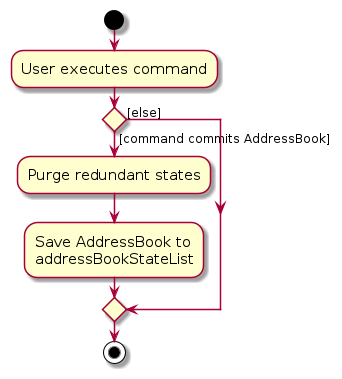
Step 6. The user executes clear, which calls Model#commitAddressBook(). Since the currentStatePointer is not pointing at the end of the addressBookStateList, all address book states after the currentStatePointer will be purged. Reason: It no longer makes sense to redo the add n/David … command. This is the behavior that most modern desktop applications follow.
The following activity diagram summarizes what happens when a user executes a new command:
Design considerations:
Aspect: How undo & redo executes:
Alternative 1 (current choice): Saves the entire address book.
- Pros: Easy to implement.
- Cons: May have performance issues in terms of memory usage.
Alternative 2: Individual command knows how to undo/redo by itself.
- Pros: Will use less memory (e.g. for
delete, just save the person being deleted). - Cons: We must ensure that the implementation of each individual command are correct.
- Pros: Will use less memory (e.g. for
Documentation, Logging, Testing, Configuration, Dev-Ops
Appendix: Requirements
Product scope
Target user profile:
- has a need to manage a significant number of contacts and weddings
- freelance wedding planners who need to manage contacts for multiple weddings
- wishes to centralise the management of contacts and weddings into one spot
- can type fast
- prefers typing to mouse interactions
- is reasonably comfortable using CLI apps
Value proposition: manage contacts and weddings faster than a typical mouse/GUI driven app
User stories
Priorities: High (must have) - * * *, Medium (nice to have) - * *, Low (unlikely to have) - *
| Priority | As a … | I want to … | So that I can… |
|---|---|---|---|
* * * | user | add a client/vendor with their details | keep track of my contacts |
* * * | user | delete a client/vendor's record | remove outdated or irrelevant clients/vendors |
* * * | user | retrieve a client/vendor's record | view the details of my clients/vendors |
* * * | user | update a client/vendor's detail | have the most updated information for my contacts |
* * * | user | search for a client/vendor by name or wedding date | quickly find the relevant personnel for a wedding |
* * * | user | add a wedding event with its details | keep track of the weddings that I am handling |
* * * | user | view a list of wedding event with its details | view the details of the wedding |
* * * | user | view a list of wedding events sorted in ascending order by date | have a clear picture of the upcoming weddings |
* * * | user | delete a wedding event | remove outdated or irrelevant weddings |
* * * | user | edit a wedding event | update the details of the wedding with the correct information |
* * * | user | add a task to a wedding event | keep track of the tasks that need to be done for the wedding |
* * * | user | delete a task from a wedding event | remove outdated or irrelevant tasks |
* * * | user | tag vendors to specific weddings | know which vendors are handling which events |
* * | user | view a summary of all my tasks related to a wedding | have a clear picture of what needs to be done |
* * | user | filter according to roles / event | have a clear picture of who I need to liaise with for |
* | user | mark and unmark my tasks related to a wedding | know which are the tasks that I have yet to complete |
* | user | have a confirmation message before I add very similar contacts | avoid accidentally adding duplicate contacts |
Use cases
(For all use cases below, the System is EasyWeds and the Actor is the User, unless specified otherwise)
Use case: UC01 - Add a Contact
MSS
User inputs the command to add contact
EasyWeds adds the new contact
Use case ends.
Extensions
2a. The field(s) is/are empty.
2a1. An error message is shown.
Use case ends.
2b. The name of the new contact matches an existing contact in the list.
2b1. An error message is shown.
2b2. User has to confirm whether to add this duplicate contact.
Use case ends.
Use case: UC02 - List Contacts
MSS
User inputs the command to list contacts
EasyWeds shows the list of contacts
Use case ends.
Extensions
2a. There are no contacts to show.
Use case ends.
Use case: UC03 - Delete a Contact
MSS
User requests to list contacts (UC02)
EasyWeds shows a list of contacts
User requests to delete a specific contact
EasyWeds deletes the contact
Use case ends.
Extensions
3a. The contact does not exist in the list.
3a1. An error message is shown.
Use case resumes at step 2.
Use case: UC04 - Edit a Contact
MSS
User requests to list contacts (UC02)
EasyWeds shows a list of contacts
User requests to edit a specific contact in the list
EasyWeds edits the contact
Use case ends.
Extensions
3a. The contact does not exist in the list.
3a1. An error message is shown.
Use case resumes at step 2.
3b. The edited name is a duplicate of an existing name in the list.
3b1. An error message is shown.
Use case resumes at step 2.
Use case: UC05 - Search Contacts by Name
MSS
User requests search for contacts that have a certain 'keyword' in their name
EasyWeds shows a list of contacts that matches the 'keyword'
Use case ends.
Extensions
2a. No matching contact is found.
2a1. An error message is shown.
Use case ends.
Use case: UC06 - Search Contacts by Role
MSS
User requests search for contacts that have a certain 'keyword' in their role
EasyWeds shows a list of contacts that matches the 'keyword'
Use case ends.
Extensions
2a. No matching contact is found.
2a1. An error message is shown.
Use case ends.
Use case: UC07 - Add a Wedding Event
MSS
User inputs the command to add wedding
EasyWeds adds the new wedding
Use case ends.
Extensions
2a. The field(s) is/are empty.
2a1. An error message is shown.
Use case ends.
2b. All the fields in the input match an existing wedding event in the list.
2b1. An error message is shown.
Use case ends.
Use case: UC08 - View Wedding Events by Wedding Date
MSS
User inputs the command to list wedding events sorted from earliest to latest date
EasyWeds shows the list of wedding events
Use case ends.
Extensions
2a. There are no wedding events to show.
Use case ends.
Use case: UC09 - View Wedding Events by Wedding ID
MSS
User inputs the command to list wedding events sorted by wedding ID
EasyWeds shows the list of wedding events
Use case ends.
Extensions
2a. There are no wedding events to show.
Use case ends.
Use case: UC10 - Delete a Wedding Event
MSS
User requests to list wedding events (UC08)
EasyWeds shows a list of wedding events
User requests to delete a specific wedding event
EasyWeds deletes the wedding event
Use case ends.
Extensions
3a. The wedding event does not exist in the list.
3a1. An error message is shown.
Use case resumes at step 2.
Use case: UC11 - Edit a Wedding Event
MSS
User requests to list wedding events (UC08)
EasyWeds shows a list of wedding events
User requests to edit a specific wedding event in the list
EasyWeds edits the wedding event
Use case ends.
Extensions
3a. The wedding event does not exist in the list.
3a1. An error message is shown.
Use case resumes at step 2.
3b. The edited wedding name, date and location is a duplicate of an existing wedding event in the list.
3b1. An error message is shown.
Use case resumes at step 2.
Use case: UC12 - Tag Contacts to Wedding Events
MSS
User inputs the command to tag a contact to a wedding event
EasyWeds adds the tag for the wedding event to the contact specified
Use case ends.
Extensions
2a. The contact does not exist.
2a1. An error message is shown.
Use case ends.
2b. The wedding does not exist.
2b1. An error message is shown.
Use case ends.
Use case: UC13 - Untag Contact from Wedding Event
MSS
User inputs the command to untag a contact from a wedding event
EasyWeds removes the tag for the wedding event from the contact specified
Use case ends.
Extensions
2a. The contact does not exist.
2a1. An error message is shown.
Use case ends
2b. The wedding does not exist.
2b1. An error message is shown.
Use case ends.
2c. The wedding specified is not tagged to this contact.
2c1. An error message is shown.
Use case ends.
Use case: UC14 - Filter Contacts
MSS
User requests filtering contacts that are tagged to a certain wedding event
EasyWeds shows a list of contacts that contain the tag
Use case ends.
Extensions
2a. The wedding does not exist.
2a1. An error message is shown.
Use case ends.
2b. There are no contacts tagged to the wedding.
2b1. An error message is shown.
Use case ends.
Use case: UC15 - Add a Task to a Wedding
MSS
User inputs the command to add a task to a specific wedding
EasyWeds adds the task to the wedding
Use case ends.
Extensions
2a. The wedding does not exist.
2a1. An error message is shown.
Use case ends.
Use case: UC16 - Delete a Task from a Wedding
MSS
User inputs the command to delete a task from a specific wedding
EasyWeds deletes the task from the wedding
Use case ends.
Extensions
2a. The wedding does not exist.
2a1. An error message is shown.
Use case ends.
2b. The task index is invalid.
2b1. An error message is shown.
Use case ends.
Use case: UC17 - Clear Contact Book
MSS
User inputs the command to clear the contact book
EasyWeds asks for confirmation
User confirms the action
EasyWeds clears all contacts
Use case ends.
Extensions
2a. The contact book is already empty.
2a1. EasyWeds clears the contact book without asking for confirmation.
Use case ends.
3a. User does not confirm the action.
3a1. The clear operation is cancelled.
Use case ends.
Non-Functional Requirements
- Should work on any mainstream OS as long as it has Java
17or above installed. - Should be able to hold up to 1000 persons without a noticeable sluggishness in performance for typical usage.
- A user with above average typing speed for regular English text (i.e. not code, not system admin commands) should be able to accomplish most of the tasks faster using commands than using the mouse.
- The system should respond to user commands within 2 seconds, even under peak load conditions.
- The application should handle errors gracefully, providing clear and helpful error messages.
- Adhere to a consistent coding style with comprehensive inline documentation and JavaDocs.
- User interface should be intuitive and accessible
- Candidate data should be stored securely, ensuring unauthorized users cannot access sensitive information.
- Data should not be lost between each session and be persistently stored.
Glossary
- Mainstream OS: Windows, Linux, Unix, MacOS
- MSS: Main Success Scenario which describes the most straightforward interaction for a given use case, which assumes nothing goes wrong
- JSON: JavaScript Object Notation, a lightweight data-interchange format
- Client: A person who hires a wedding planner to organise their wedding. Clients in EasyWeds are individuals or couples whose event details are tracked within the system
- Vendor: A service provider involved in the wedding, such as florists, caterers, photographers. Vendors in EasyWeds are linked to events and are categorised based on their service types
Appendix: Instructions for manual testing
Given below are instructions to test the app manually.
Note: These instructions only provide a starting point for testers to work on; testers are expected to do more exploratory testing.
Launch and shutdown
Initial launch
Download the jar file and copy into an empty folder
Double-click the jar file Expected: Shows the GUI with a set of sample contacts. The window size may not be optimum.
Saving window preferences
Resize the window to an optimum size. Move the window to a different location. Close the window.
Re-launch the app by double-clicking the jar file.
Expected: The most recent window size and location is retained.
Deleting a person
Deleting a person while all persons are being shown
Prerequisites: List all persons using the
listcommand. Multiple persons in the list.Test case:
delete 1
Expected: First contact is deleted from the list. Details of the deleted contact shown in the status message. Timestamp in the status bar is updated.Test case:
delete 0
Expected: No person is deleted. Error details shown in the status message. Status bar remains the same.Other incorrect delete commands to try:
delete,delete x,...(where x is larger than the list size)
Expected: Similar to previous.
{ This is a non-exhaustive list }
Saving data
Dealing with missing/corrupted data files
Close the app. Delete the file named
addressbook.jsonin the same folder as the jar file.Re-launch the app by double-clicking the jar file.
Expected: The app starts with an empty address book. The status message shows that the data file is missing or corrupted.Close the app. Replace the file named
addressbook.jsonwith a new file containing the stringinvalid data.Re-launch the app by double-clicking the jar file.
Expected: The app starts with an empty address book. The status message shows that the data file is missing or corrupted.
Appendix: Effort
Project Scope and Difficulty
This project was much more tedious than the Address Book (AB3) reference project.
While AB3 deals exclusively with one entity type (Persons), our project, EasyWeds, expands its scope by incorporating multiple entities, Weddings and tasks, and establishing links between them.
This broader scope required a more robust data model and detailed planning for application logic, especially for actions that involve managing interdependencies.
Key challenges included:
- Entity Linking: Establish reliable relationships between contacts, weddings, and tasks.
- Testing and Coverage: Ensuring such a complex system is thoroughly tested.
- Communication: Coordinating clear communications among team members with differing perspectives, methodologies, and schedules.
Effort Involved:
Overall, this project required roughly 2 times the effort of AB3, primarily due to the additional complexity and volume of content implemented.
Enhanced Wedding Management System ★★★
- Complete redesign of the underlying data model to support multiple wedding events with various associated data points.
- Created new data models for Wedding, WeddingTask, and associated classes.
- Implemented a unique ID system for weddings to ensure consistent referencing.
- Developed validation logic for wedding dates to ensure they are valid and in the future.
- Designed and implemented a tagging system to associate contacts with specific weddings.
- Added specialized commands for wedding management (addWedding, editWedding, deleteWedding).
Task Management System ★★
- Designed a task model that supports descriptions and completion status.
- Integrated tasks directly into the wedding model for natural organization.
- Created specialized commands for task operations (addTask, listTask, mark, unmark, deleteTask).
- Implemented validation to ensure tasks are associated with valid weddings.
Enhanced Contact Management ★★★
- Extended the Person model to include role information essential for wedding planning.
- Implemented a robust tagging system to associate contacts with multiple weddings.
- Created specialized filtering mechanisms to view contacts by wedding or role.
- Improved the contact display to show relevant wedding associations.
UI Enhancements ★★
- Created a split-panel design to show both weddings and contacts simultaneously.
- Implemented a detailed view for wedding tasks and related information.
- Added visual indicators for tagged relationships between contacts and weddings.
- Designed a comprehensive output display for command results.
Storage Component Expansion ★★
- Extended the JSON storage format to include wedding and task data.
- Implemented bidirectional references for weddings and contacts.
- Ensured data integrity during save/load operations.
- Added validation to handle potential data corruption scenarios.
Comprehensive Testing ★★★
- Created extensive integration tests for wedding-contact relationships.
- Developed unit tests for all new commands and features.
- Conducted manual testing sessions for complex workflows.
- Implemented edge case testing for data validation.
Accomplishments:
Despite the challenges, our team successfully:
- Implemented a robust data model that effectively manages the relationships between contacts, weddings, and tasks.
- Developed a comprehensive set of commands that allow users to interact with the system in a meaningful way.
- Ensured that the application is thoroughly tested, with a high level of code coverage.
- Added significant new functionality, including the ability to add, delete, and edit contacts, weddings, and tasks, and tag people to different weddings.
Library Usage and Reuse:
Critical libraries played a key role in streamlining our work:
- JUnit 5: Extensively used for unit testing, improving code quality and reducing testing time by an estimated 15-20% compared to writing tests from scratch.
- JavaFX: Employed to build the Graphical User Interface (GUI), significantly accelerating the implementation process.
Appendix: Planned Enhancements
Team size: 5
The following planned enhancements target future improvements for EasyWeds. Each enhancement describes a feature gap in the current system and outlines the proposed solution along with the expected benefits. This section lists enhancements that focus on advancing wedding task management and overall user experience.
1. Integrate Task Deadlines
- Feature Gap: Wedding tasks currently lack deadline functionality, which limits the ability to prioritize and track upcoming work.
- Proposed Fix: Add deadlines to each wedding task, enabling users to assign due dates and times.
- Expected Outcome: Improved task management with clear deadlines, leading to better prioritization and timely completion of tasks.
2. Advanced Task Filtering and Sorting by Deadline
- Feature Gap: Users are currently unable to quickly identify urgent tasks since the task list lacks filtering and sorting by deadline.
- Proposed Fix: Enhance the task management interface to include options for filtering and sorting wedding tasks based on their assigned deadlines.
- Expected Outcome: Faster identification of high-priority tasks and improved workflow through better visual organization.
3. Support for Non-Latin Characters in Names
- Feature Gap: Currently, only alphanumeric Latin characters are allowed for the name field, which may exclude users whose names include non-Latin characters (e.g.,Chinese, Arabic).
- Proposed Fix: Revise the validation rules for the name field to accept non-Latin characters while maintaining data integrity. This could involve updating the regex patterns and ensuring compatibility with the rest of the system.
- Expected Outcome: Increased inclusivity and usability for international users, allowing a more diverse range of names to be stored accurately within EasyWeds.
4. Expanded Search Capabilities
- Feature Gap: The current search functionality only supports exact keyword matching, which may lead to difficulties when users mistype names or use abbreviations.
- Proposed Fix: Implement a fuzzy search algorithm and support for partial matches, so that slight misspellings or incomplete queries still return relevant results.
- Expected Outcome: Users will experience more forgiving and intuitive search behavior, making it easier to locate contacts and events even with minor input errors.
5. Batch Tag/Untag Contacts
- Feature Gap: Currently, users must tag or untag contacts to weddings one by one. For large weddings with many vendors and clients, this process is time-consuming and inefficient.
- Proposed Fix: Implement a batch tagging system that allows users to select multiple contacts and tag or untag them to a wedding in a single command.
- Expected Outcome: Wedding planners will experience a significant reduction in administrative overhead, leading to a more efficient workflow when managing contacts for large events.
6. Better Wedding ID handling after deletion
- Feature Gap: When a wedding is deleted, its ID is not reused, which results in non-sequential wedding IDs (e.g., W1, W3, W4). This inconsistency can confuse users and wastes available identifiers.
- Proposed Fix: Implement proper wedding ID management that either reuses IDs from deleted weddings for new entries, or provides an optional command to renumber/reindex all wedding IDs sequentially.\
- Expected Outcome: Wedding IDs will be managed more effectively, eliminating gaps and providing users with a clear and organized identifier sequence for all weddings.